Pages

Showing posts with label Pcsx2. Show all posts

Tuesday, July 29, 2014

How to delete save files in pcsx2 (1.2.1)

So, you've been playing on the emulator for a while now and you get the message that you need to clear some files of your memory card.

This is a step by step guide how you can easily do it.

1.Make sure you select the following option. Be SURE not to have a game running or you will be bombarded by messages.
2. Boot the cd dvd like you usually do


 You will this message →

3. Click the browser

4. Choose your memory card


5. Find the savefiles you want to be deleted


6. Delete them!


And this is how you delete your savefiles.

After this turn your cdvd back to ISO


Monday, July 28, 2014

Pcsx 2 and your pc hardware

 A couple of weeks ago, I decided to improve my pc by replacing my old video card the Geforce 9600gt with the several times more powerful Geforce 660.

Naturally, as a fan of ps2 games, I wanted to emulate a game called Vice city stories. If you read my blog already, you would know that open world games very often cause an fps drop when emulating, since it is difficult to handle them for your pc. The reason for this is: the emulator is still in development and not 100% complete. But I gotta say, the emulation itself is very nice, graphical bugs are non existent in the current version (comparing it to the old versions that I had used before, even emulating this game).

Here are my results with the new graphics card:

The fps drops have not changed.


 As it turns out the emulator takes almost all power from the CPU.

If you upgrade that, then you will truly see a difference.

For now the performance is based on CPU>GPU

The developers are trying to change it to GPU>CPU, but it might take years for it to happen.

Pc games that I own, however have shown great improvements.

This is a quick notice to ps2, (pcsx2) fans. I hope this information is valuable to your own experience.

Saturday, March 15, 2014

How to speed up PCSX 2 (1.2.1)

Simple steps:

 1. Go to the emulation settings
 2. Choose a preset
3. Choose your best balanced option
 4. Follow this
 5. Try out all renderers. Stick with the 3D9 and 3D11 hardware. Less graphical bugs and best fps (at least for my pc)


Other important things you can do:
Turn off other programs that take memory. Movies, browsers take up a lot of memory
Upgrade your hardware. Mainly CPU

Saturday, February 23, 2013

How to choose a game for the Pcsx2 emulator

How to choose a game for the Pcsx2 emulator

Hello everyone. Today I am going to explain how to find out if your ps2 game is going to be emulated in a way you want. If you have already run a game you might have noticed that the emulator takes a lot of energy to work correctly. Multitasking while running the emulator will definitely cause a certain drop of fps on your game. Some games can't reach the wanted fps even if you aren't using any other programs. Here are some tips that might help you:

1. The pcsx2 emulator is definitely advanced and not in it's beta stage anymore. However, there might be errors in certain games. To check the emulator compactibility see the website of the Pcsx2 team>> http://pcsx2.net/compatibility-list.html
2. Use logic when considering if your computer is not the newest one on the pc market. If your pc is weak be sure to avoid emulating games that show a lot of environment at the same time, like open world games (the gta series, saints row 1), racing games like need for speed.
3. If don't want to give up playing a laggy game, consider tinkering with the configurations of your emulator (config>>emulation settings, presets), (config>>video>>plugin settings)

The reason I wanted to bring up those steps is to help you understand the certain issues you might face when trying to emulate a ps2 game. Not being able to emulate your game on the full fps is very annoying. The compatibility list has been configured with each new version of the emulator so you might see a situation where an old version might emulate a game perfect but a newer version would show different animation or graphic bugs (happened to me once). If you have nothing to lose, then try the games mentioned in my second tip even with a weaker pc. If however, you want to buy or rent a ps2 game and you see that it might not work yet/or work full fps, then consider my tips and just make judgement on your own.

Monday, February 18, 2013

Playstation 2 emulator set up tutorial for the PC

PCSX 2 set up tutorial


 For those who don't know, there is a emulator which allows any better pc to emulate any ps2 game. After working with this emulator for some time now, I am going to make a tutorial how you all can set up the emulator to enjoy many games that were ps2 exclusive.
Your first step would be to download the main file here:
 http://pcsx2.net/download.html (I will base this tutorial for the windows edition)
  
download the standalone installer
Step two:
install it (there really shouldn't be any issues in this part)
now open your emulator
the emulator will need some configuration here!


Now at the bios selection you will have to select a bios file. The files should look like my files below and put in the pcsx2 documents directory.▼
 ←here is what you have to pay attention to:

the only plugin you should check out is the first one.
Be sure to change the selection that fits your computers hardware. If your computer is older then select the SSE2 plugin, or the SSE41 for a newer computer. Check google for more precise information about this matter.


 ←Config>emulation settings should look like this (change it later if you experience lag)


your next step is to organize yourself a memory card file. The Pcsx2 development team does not tolerate pirating. But lets be honest, you can find those files on the Internet. Just use google

Now you almost done!
Now go config>video(gs)>plugin setting and choose the renderer to your computers hardware capabilities direct x9 or x10 ( I think you have to choose the hardware


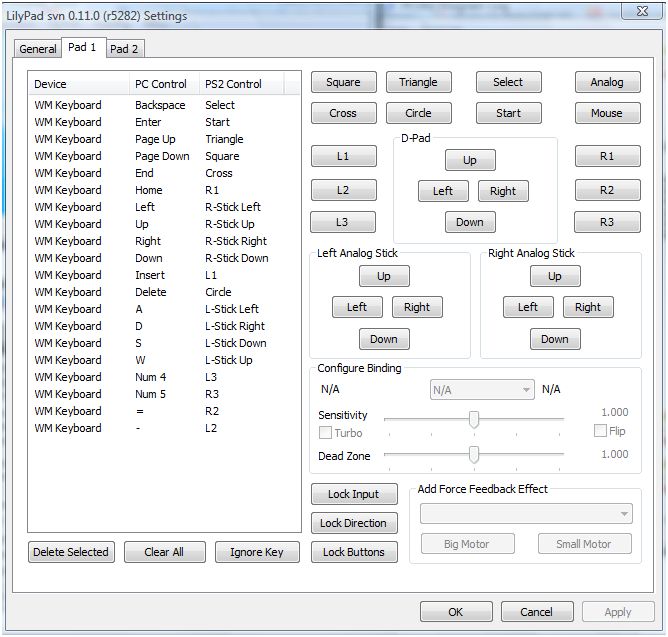
 Now go config>contoller>plugin and order the button you want
The contoller setting should be understandable.
Here is how I choose my button configuration

  
  And now you should be set for the emulation. 
The last step is:  CDVD>Iso selector and browse your ps2 iso, mid, nrg or bin file
 Then go to System>Boot CDVD (fast)
After (hopefully) you game starts, your memory card should be formatted and then you can start your PS2 game. If there is anything wrong with your emulator, and it doesn't work, don't hesitate to contact me and I will answer your problem on a new post or through a private message. If you want a lightning speed answer you might find your answer on google, there are a lot of guides for the pcsx2.I hope this tutorial helped you to emulate the legendary Ps2 experience :).