Pages

Sunday, May 12, 2013

Sorry no video this week :(

No video this week


  Hey everyone. I just want to say that this week has been a very tough one and I am not going to be able to make the fourth part of my Oblivion: the battles of the Forgotten this week. The main reason why I can't do it is the following: health issues. Yep, this Friday I underwent surgery for my toenail. The surgeon had to cut a part of my nail because I had an ingrown nail. My whole weekend consists of taking pain killers and just laying around. Basically I could film the new video if I wanted to, however the mild and sometimes severe pain just...distracts me from doing it. Sorry about that. But don't worry. Next week my condition should be a lot better and Friday I will have a free day from high school so I will most likely upload a new video by then, maybe even in the middle of the week.  However, what worries me even more is that on the 25th of this month I will have my English exam!! I am not all to worried about my English exam, the history exam is what really worries me. 
So that's that, thank you for your understanding my dear readers.
Your's truly
Kaimas 7
P.s: Here is a beautiful portrait of my toe  

Wednesday, May 1, 2013

Happy International Workers' Day!

Happy
International Workers' Day!


 Today is supposed to be a day where (ironically) nobody goes to work, but I decided to work even harder today. A new video? Two new videos? Three new videos! All right, all right settle down! Today I am posting: a new Oblivion: the battle of the Forgotten and two funny Gta IV videos. I don't know if you all are excited about the gta videos, but I thought they would be nice, little funny addons to my youtube channel. Now onto the Oblivion video...
In part 3 the Forgotten push even more into the empire and they face greater resistance. Two battle scenes, and a LOT of work was put into the map animation. And to keep you all excited, I even put in a little hint into the video about what might happen in the next part of the series. It is a very abstract and uninformative hint. I hope you all have a nice day and I hope you enjoy my new videos. Peace :)

 http://www.youtube.com/watch?v=40L4TncdTyM

 Gta IV:
http://www.youtube.com/watch?v=RQYMzbGWlXM
http://www.youtube.com/watch?v=yGc1G0uiV_k

Monday, April 22, 2013

Second video! The battle continues!

Second video!  The battle continues!


Hey everyone, yep, a new video in my series Oblivion: the Forgotten battles. I want to keep this post short because there is actually not a lot of info about my new video. All I can say is that I learned a lot of new scripts to make the combat in my videos more fluent (no attacking npc's should attack  teammates anymore :D ). In this video I introduced only a little detail about the counterforce of the Cyrodiil empire (!!Spoiler!!)  (it's at the end of the video).Oh, I hope you guys don't  get the wrong idea, I captured a lot of action and there is a lot of  death and violence in this video!
On a personal note: 
For now I am very busy with my senior year of high school so the only time and place for the production of a new video is going to be the weekends, sorry about that. In the workdays I will try to think of new ideas for the series.

Thank you all and don't forget to check out the video! :)

>>>
http://www.youtube.com/watch?v=GTQlc6WsBu4

Monday, April 15, 2013

New video, new series!

Wooo! New video finally released!


 After a little pause I am back with an exciting new Oblivion video! Not only that, I am hoping to create a new video series which is going to be called Oblivion: the battle of the Forgotten (this video series is going to be much longer and I hope much more exciting). The timeline should be set somewhere around the end of the Oblivion crisis and the end of the third era. Big battles, alliances, I hope you all enjoy this one, because it took me a lot of blood, sweat and tears to make the introduction video. The next episodes are still being developed, there are just soooo many things I want to make to really create a believable story.

Also, this series is going to be a whole lot different then the last ones. Got my old video editor back, installed a new paint program for better picture quality and editing.

Oh and one last thing. I think you all deserve a quick glimpse at what I am working on now. I hope I didn't spoil too much ;)

New video:  http://www.youtube.com/watch?v=HZEcJ3bo6y0

Saturday, March 30, 2013

How to configurate Oblivions Deadly reflex keys

How to configurate Oblivions Deadly reflex keys

(a detailed guide)


 So these are the simple steps you have to follow to change the button controls for the mod Deadly reflex:

First step: 
Follow the location posted in the screenshot ------>
I hope there is no problem in this step.


 Step two:
Open the text document file with your notepad
See the marked yellow lines?
The first four lines are important to change for your button
 configuration
The other two lines configure the chance of activating a deadly reflex kill! The higher the number the more chance to decapitate (change the value of it from 0-99 maybe even 100)


Now all you have to do is go to the website: 
http://cs.elderscrolls.com/index.php/IsKeyPressed2
 Find the button and the code and write it down or memorize it.
Go back to your note file
Example: I want a new bash key to z.
I go to "set skycaptainsb. bashkey to" and change the value to 44. Then save it. It should look like this:
 set skycaptainsb. bashkey to 44

That is all. I hope you found this tutorial useful!

Saturday, February 23, 2013

How to choose a game for the Pcsx2 emulator

How to choose a game for the Pcsx2 emulator

Hello everyone. Today I am going to explain how to find out if your ps2 game is going to be emulated in a way you want. If you have already run a game you might have noticed that the emulator takes a lot of energy to work correctly. Multitasking while running the emulator will definitely cause a certain drop of fps on your game. Some games can't reach the wanted fps even if you aren't using any other programs. Here are some tips that might help you:

1. The pcsx2 emulator is definitely advanced and not in it's beta stage anymore. However, there might be errors in certain games. To check the emulator compactibility see the website of the Pcsx2 team>> http://pcsx2.net/compatibility-list.html
2. Use logic when considering if your computer is not the newest one on the pc market. If your pc is weak be sure to avoid emulating games that show a lot of environment at the same time, like open world games (the gta series, saints row 1), racing games like need for speed.
3. If don't want to give up playing a laggy game, consider tinkering with the configurations of your emulator (config>>emulation settings, presets), (config>>video>>plugin settings)

The reason I wanted to bring up those steps is to help you understand the certain issues you might face when trying to emulate a ps2 game. Not being able to emulate your game on the full fps is very annoying. The compatibility list has been configured with each new version of the emulator so you might see a situation where an old version might emulate a game perfect but a newer version would show different animation or graphic bugs (happened to me once). If you have nothing to lose, then try the games mentioned in my second tip even with a weaker pc. If however, you want to buy or rent a ps2 game and you see that it might not work yet/or work full fps, then consider my tips and just make judgement on your own.

Monday, February 18, 2013

Playstation 2 emulator set up tutorial for the PC

PCSX 2 set up tutorial


 For those who don't know, there is a emulator which allows any better pc to emulate any ps2 game. After working with this emulator for some time now, I am going to make a tutorial how you all can set up the emulator to enjoy many games that were ps2 exclusive.
Your first step would be to download the main file here:
 http://pcsx2.net/download.html (I will base this tutorial for the windows edition)
  
download the standalone installer
Step two:
install it (there really shouldn't be any issues in this part)
now open your emulator
the emulator will need some configuration here!


Now at the bios selection you will have to select a bios file. The files should look like my files below and put in the pcsx2 documents directory.▼
 ←here is what you have to pay attention to:

the only plugin you should check out is the first one.
Be sure to change the selection that fits your computers hardware. If your computer is older then select the SSE2 plugin, or the SSE41 for a newer computer. Check google for more precise information about this matter.


 ←Config>emulation settings should look like this (change it later if you experience lag)


your next step is to organize yourself a memory card file. The Pcsx2 development team does not tolerate pirating. But lets be honest, you can find those files on the Internet. Just use google

Now you almost done!
Now go config>video(gs)>plugin setting and choose the renderer to your computers hardware capabilities direct x9 or x10 ( I think you have to choose the hardware


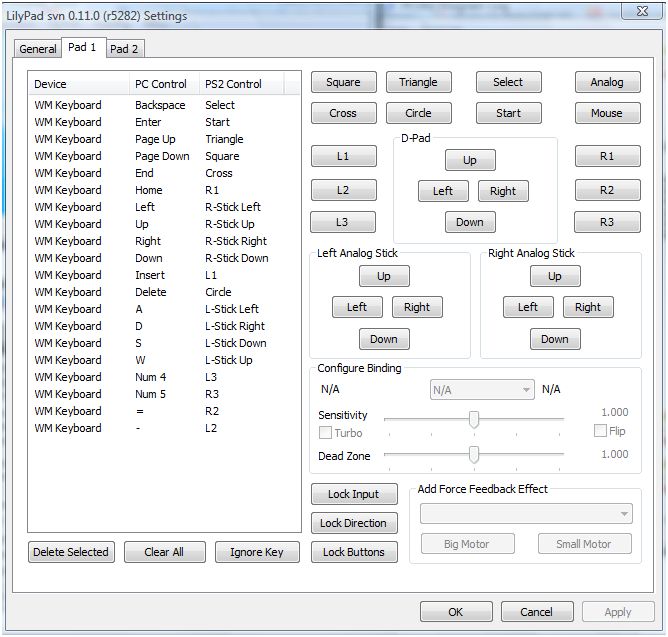
 Now go config>contoller>plugin and order the button you want
The contoller setting should be understandable.
Here is how I choose my button configuration

  
  And now you should be set for the emulation. 
The last step is:  CDVD>Iso selector and browse your ps2 iso, mid, nrg or bin file
 Then go to System>Boot CDVD (fast)
After (hopefully) you game starts, your memory card should be formatted and then you can start your PS2 game. If there is anything wrong with your emulator, and it doesn't work, don't hesitate to contact me and I will answer your problem on a new post or through a private message. If you want a lightning speed answer you might find your answer on google, there are a lot of guides for the pcsx2.I hope this tutorial helped you to emulate the legendary Ps2 experience :).