Pages

Saturday, February 23, 2013

How to choose a game for the Pcsx2 emulator

How to choose a game for the Pcsx2 emulator

Hello everyone. Today I am going to explain how to find out if your ps2 game is going to be emulated in a way you want. If you have already run a game you might have noticed that the emulator takes a lot of energy to work correctly. Multitasking while running the emulator will definitely cause a certain drop of fps on your game. Some games can't reach the wanted fps even if you aren't using any other programs. Here are some tips that might help you:

1. The pcsx2 emulator is definitely advanced and not in it's beta stage anymore. However, there might be errors in certain games. To check the emulator compactibility see the website of the Pcsx2 team>> http://pcsx2.net/compatibility-list.html
2. Use logic when considering if your computer is not the newest one on the pc market. If your pc is weak be sure to avoid emulating games that show a lot of environment at the same time, like open world games (the gta series, saints row 1), racing games like need for speed.
3. If don't want to give up playing a laggy game, consider tinkering with the configurations of your emulator (config>>emulation settings, presets), (config>>video>>plugin settings)

The reason I wanted to bring up those steps is to help you understand the certain issues you might face when trying to emulate a ps2 game. Not being able to emulate your game on the full fps is very annoying. The compatibility list has been configured with each new version of the emulator so you might see a situation where an old version might emulate a game perfect but a newer version would show different animation or graphic bugs (happened to me once). If you have nothing to lose, then try the games mentioned in my second tip even with a weaker pc. If however, you want to buy or rent a ps2 game and you see that it might not work yet/or work full fps, then consider my tips and just make judgement on your own.

Monday, February 18, 2013

Playstation 2 emulator set up tutorial for the PC

PCSX 2 set up tutorial


 For those who don't know, there is a emulator which allows any better pc to emulate any ps2 game. After working with this emulator for some time now, I am going to make a tutorial how you all can set up the emulator to enjoy many games that were ps2 exclusive.
Your first step would be to download the main file here:
 http://pcsx2.net/download.html (I will base this tutorial for the windows edition)
  
download the standalone installer
Step two:
install it (there really shouldn't be any issues in this part)
now open your emulator
the emulator will need some configuration here!


Now at the bios selection you will have to select a bios file. The files should look like my files below and put in the pcsx2 documents directory.▼
 ←here is what you have to pay attention to:

the only plugin you should check out is the first one.
Be sure to change the selection that fits your computers hardware. If your computer is older then select the SSE2 plugin, or the SSE41 for a newer computer. Check google for more precise information about this matter.


 ←Config>emulation settings should look like this (change it later if you experience lag)


your next step is to organize yourself a memory card file. The Pcsx2 development team does not tolerate pirating. But lets be honest, you can find those files on the Internet. Just use google

Now you almost done!
Now go config>video(gs)>plugin setting and choose the renderer to your computers hardware capabilities direct x9 or x10 ( I think you have to choose the hardware


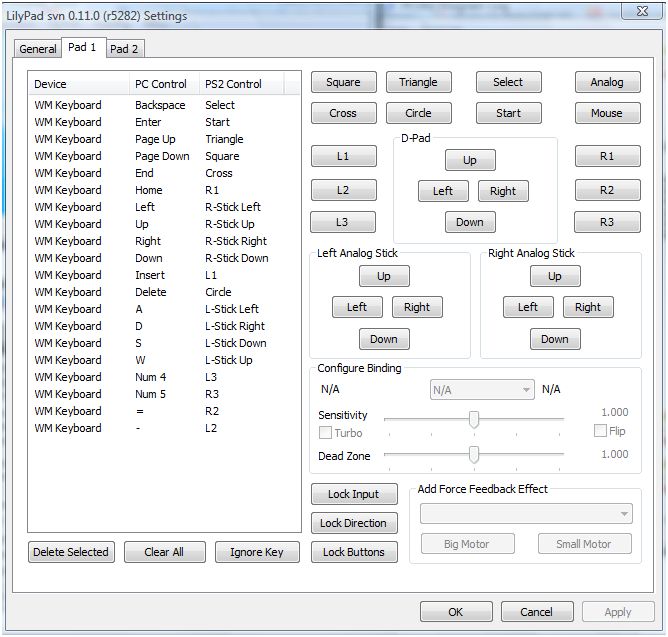
 Now go config>contoller>plugin and order the button you want
The contoller setting should be understandable.
Here is how I choose my button configuration

  
  And now you should be set for the emulation. 
The last step is:  CDVD>Iso selector and browse your ps2 iso, mid, nrg or bin file
 Then go to System>Boot CDVD (fast)
After (hopefully) you game starts, your memory card should be formatted and then you can start your PS2 game. If there is anything wrong with your emulator, and it doesn't work, don't hesitate to contact me and I will answer your problem on a new post or through a private message. If you want a lightning speed answer you might find your answer on google, there are a lot of guides for the pcsx2.I hope this tutorial helped you to emulate the legendary Ps2 experience :). 

Sunday, November 4, 2012

My Skyrim museum


Finally, today I release my Skyrim armor and weapon museum showcase. It took me more then 100 hours to get every single item without using any codes. Most items are from the vanilla Skyrim, the modded items are not overpowered. Almost every item is upgraded to legendary. If you have some questions about the mods I am using just ask me. Here is a list of mods not mentioned in the video:
JaySuS swords
Clothing retexture (for the vanilla robes like the Archmage robe)
Extended vanilla weapons
And special thanks to Ttek for making the museum mod
Every mod is available at Skyrim nexus! >>> http://skyrim.nexusmods.com/
My video >> http://www.youtube.com/watch?v=tyOEFH2NVjY


Tuesday, October 23, 2012

My mod review: The Fifth Gate

My mod review:  The Fifth Gate

Halloween isn't far away so I have been searching for a scary mod that could get me into the Halloween spirit. This may be not the most scariest mod, but I enjoyed it very much. This mod has been made by a guy name GlArtMods. The mod is downloadable at
http://skyrim.nexusmods.com/mods/24351 
Here are my pros and cons:
Pros:
This mod features a new quest
Some entertaining puzzles
A new retextured mob
A short story
Nice visual effects
Three in game movie sequences (a lot of effort was put into this mod obviously)
A good ending
Cons:
Not a lot of  new mobs like mummies or vampires
No significant reward for you to keep as an artifact

 I would give this mod a 8/10 because of the effort and ideas. Because the mod weighs 60mb I was hoping for even more details, but I found this mod entertaining, and if you want some excitement in Skyrim for the Halloween period I would suggest getting this fun quest mod.

Sunday, October 21, 2012

Introduction

Welcome dear Skyrim fans. 
Here is my youtube account where I will post some skyrim videos. For now there are only Oblivion videos, but I have plans about changing that. My next video may be a video about the different artifacts and rare items I have found in the game. Vanilla and modded.


youtube.com/kaimas7